01
Dictate directly into the current app
Starts recording over Codex with Fn, then inserts the finalized Korean transcript once at the existing cursor position.
Kitsch Labs · Shipped Desktop Product
Mora is Kitsch Labs' shipped desktop dictation product. Speak from a global shortcut, let it clean up the sentence, and insert the result at the active cursor. Version 0.1.0 is available for macOS and Windows.
Actual product
The first demo shows the complete interaction: start recording from a shortcut, finish the session, and insert the transcript into the app currently in use.
Starts recording over Codex with Fn, then inserts the finalized Korean transcript once at the existing cursor position.
Shows usage, the Fn shortcut, input microphone, dictation language, writing controls, and personalization entry points in one home view.
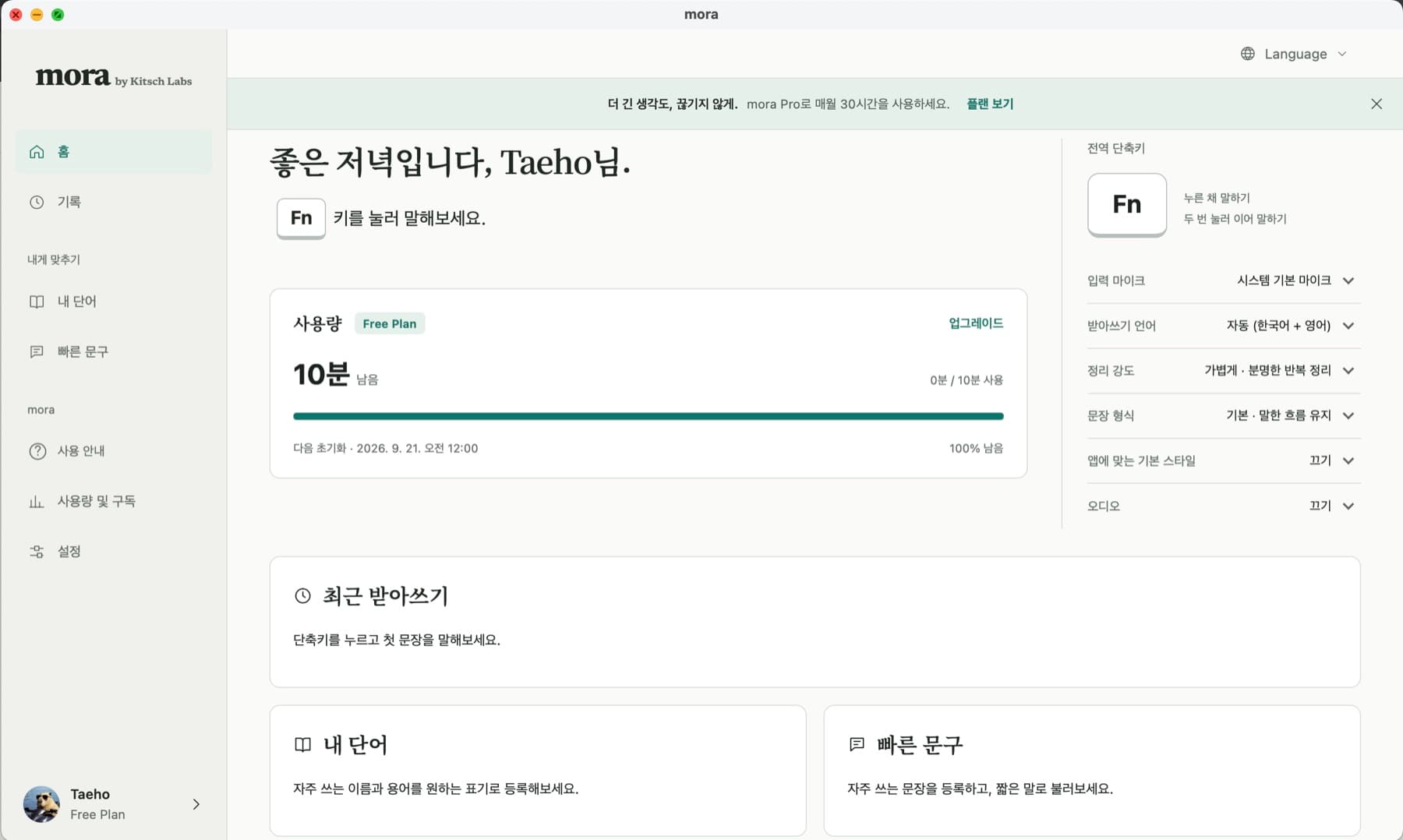

Mora is not a separate chat window that requires copying a transcript. It starts recording from a global shortcut in any app and returns the result to the current cursor. Microphone permission, global shortcuts, focused-field insertion, and an overlay that does not steal focus are as important as transcription accuracy.
Desktop, Flow Web, and the shared Kitsch Voice API live in separate repositories and data boundaries. The realtime STT path needed to connect Flow JWTs, a dedicated Supabase entitlement, and transcript storage without breaking existing Kitsch authentication and usage accounting.
A Rust session controller in the Tauri 2 desktop app owns the global shortcut, microphone capture, 24 kHz mono PCM normalization, and text insertion. React renders a non-focus-stealing overlay and settings UI, while the streaming client connects to FastAPI WebSocket with a short-lived Flow JWT.
The FastAPI STT runtime selects Flow or Kitsch service paths from a verified product context before opening a Soniox Realtime WebSocket. It keeps one logical session ID across planned transport rollover and distinguishes finalized segments from terminal completion. Raw audio is not stored, and disconnected gaps are not replayed.
The database is not selected from a client-provided tenant or unverified issuer. Signature, issuer, audience, and session claims produce a typed product context that selects the Flow repository and entitlement.
Rollover segments accumulate with terminal=false. Text is inserted once only after server-side close produces terminal=true. A Stop during rollover reconnects with the same logical session and sends the terminal commit.
Replaying a gap can duplicate transcripts and distort usage. The client sends bounded PCM, drops disconnected intervals, and does not store raw audio by default.
Deterministic desktop tests cover bounded audio delivery, PCM normalization, same-session rollover, disconnected-gap drops, terminal completion, and cancellation. API tests cover Flow and Kitsch authentication isolation, entitlement checkpoints, transcript persistence, provider cleanup, and idempotent session close.
The macOS demo verifies the Fn recording overlay and focused-field insertion, and v0.1.0 installers are publicly available for macOS and Windows. Provider performance is not yet supported by enough production evidence, so no performance metric is presented here.